Install and open
Drag it to Applications and open it once. It finds the local stores your agents already keep - ~/.claude, ~/.codex, Cursor's database and the rest - and indexes them in the background.
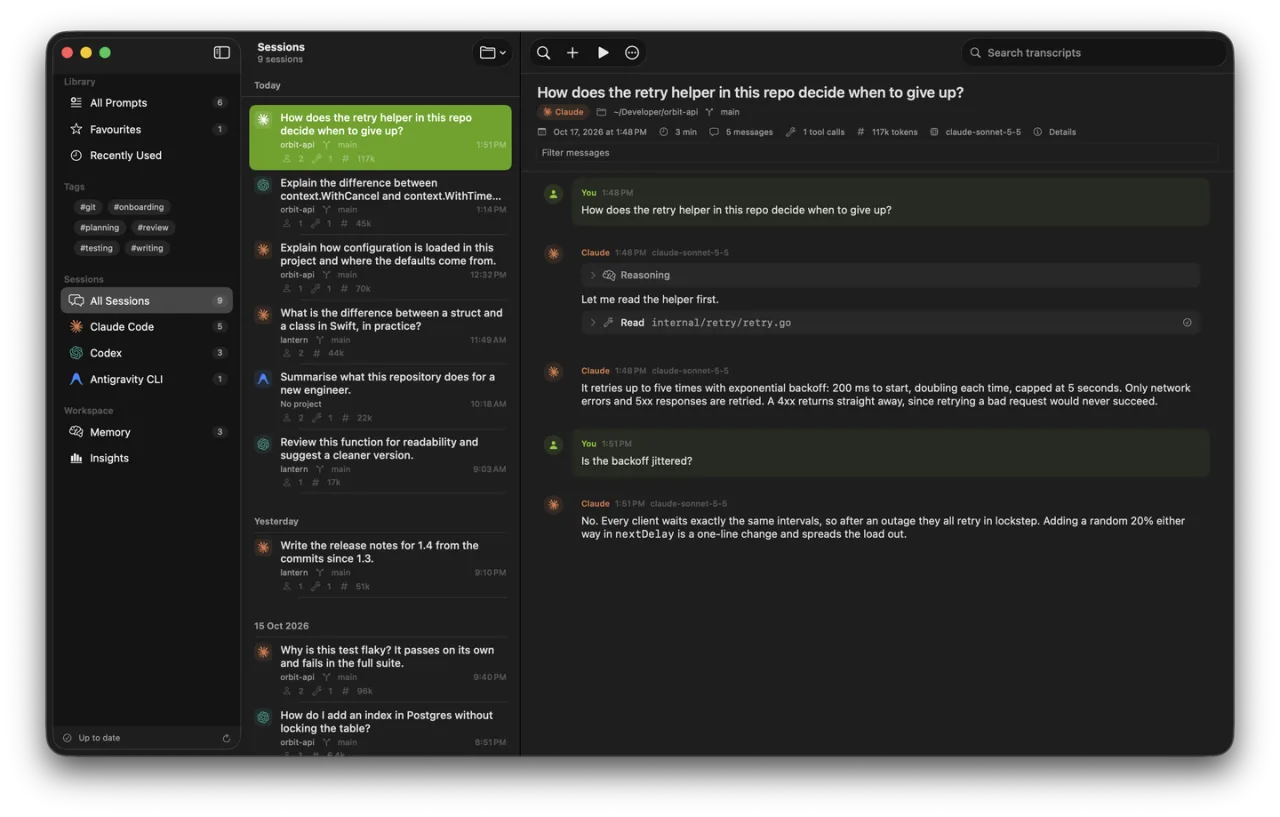
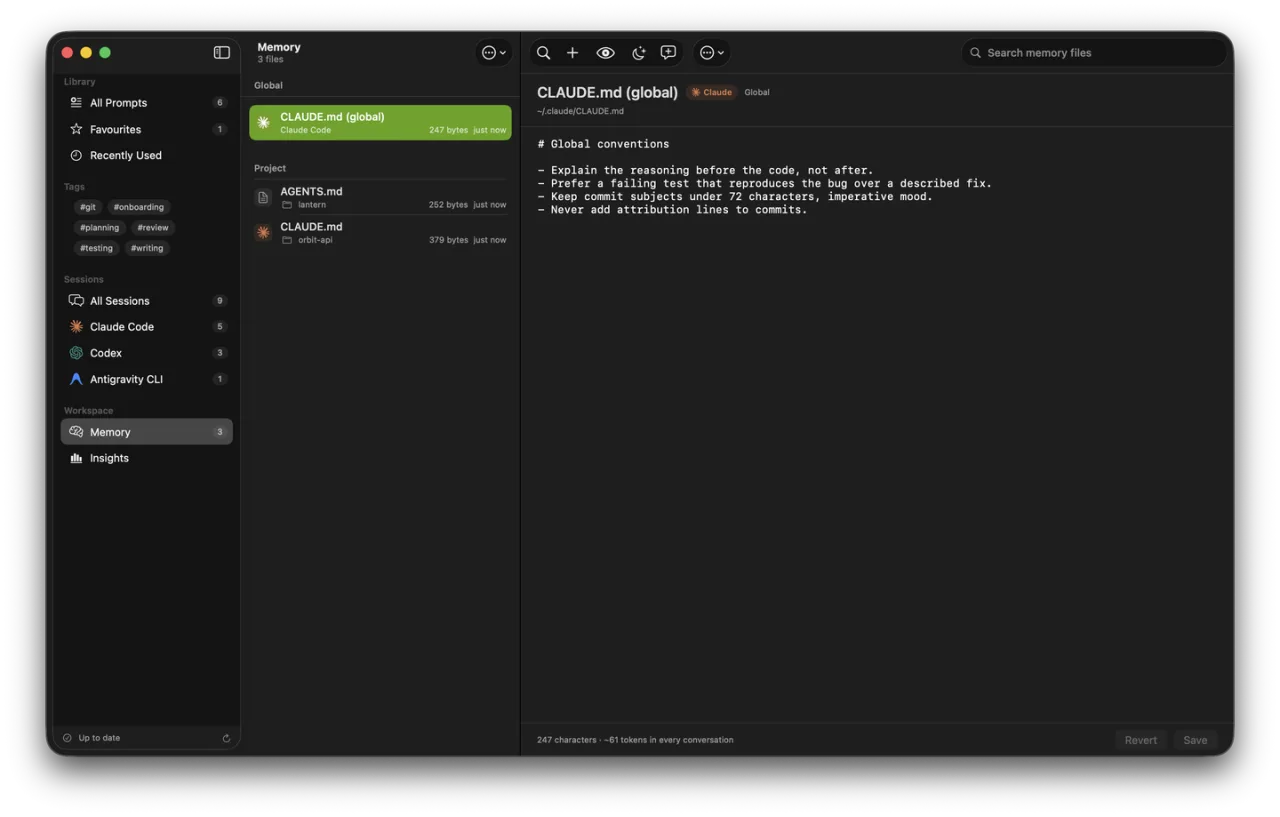
Claude Code, Codex, Cursor and other coding tools save your conversations on your Mac, each in its own format. Prompt Deck reads conversations from all of those agents and puts them on one screen, beside your reusable prompts and the memory files your agents load before they answer.
Free to use · macOS 14+ · Universal · Signed and notarized by Apple
How it works
Nothing to set up or import. Open it and your history is there.
Drag it to Applications and open it once. It finds the local stores your agents already keep - ~/.claude, ~/.codex, Cursor's database and the rest - and indexes them in the background.
One list, grouped by day, searchable across every agent. Open a transcript to read tool calls, reasoning and sub-agent runs.
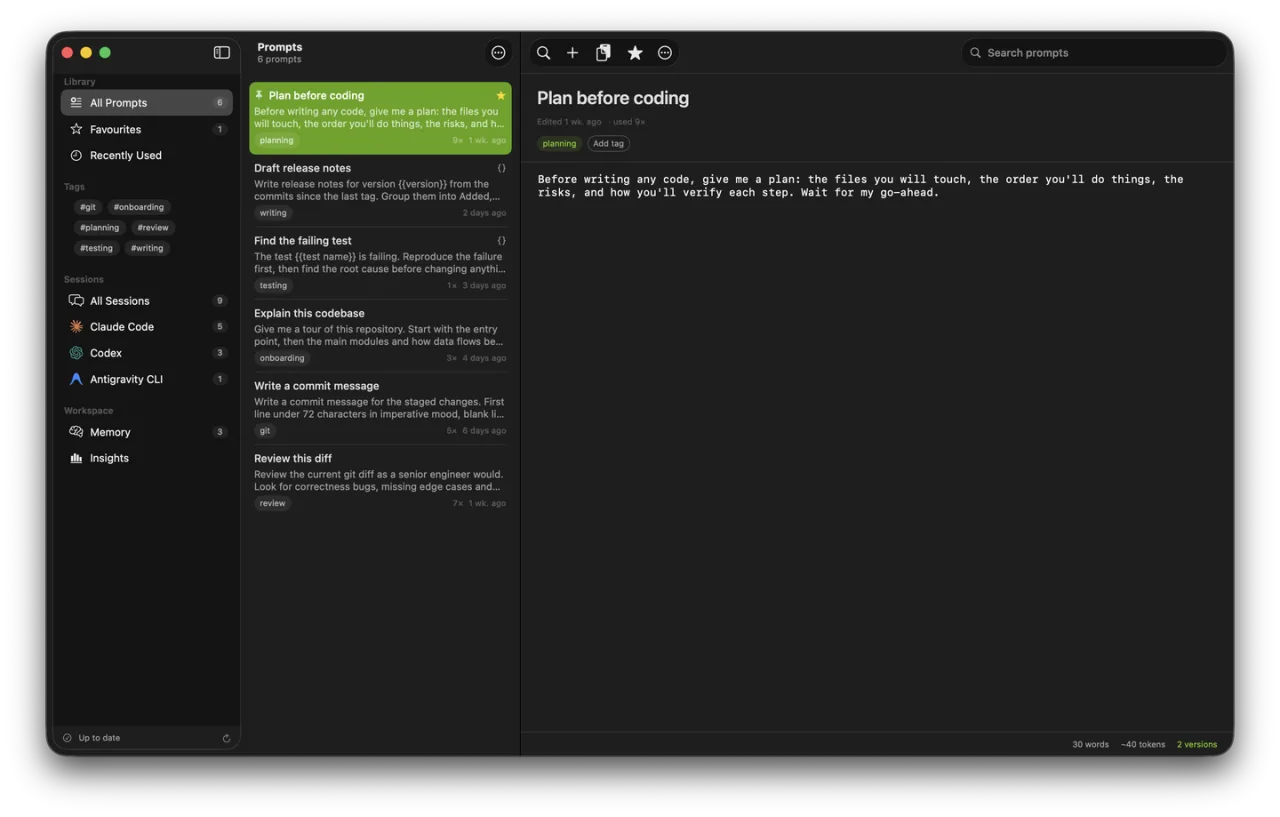
Save any message as a prompt with {{variables}}, install it as a slash command, and keep your memory files consistent across tools.
What's inside
Claude Code, Codex CLI, Cursor, OpenCode, Antigravity CLI, GitHub Copilot, Qwen Code, DeepSeek Harness, Continue, Pi and Aider. Grouped by day, filtered by project, searchable across all of them.
When an agent spawns a sub-agent, its whole conversation is normally invisible. Prompt Deck opens it inline, under the call that started it, however deep it nests.
Every CLAUDE.md, AGENTS.md, GEMINI.md, QWEN.md, .cursorrules and Copilot instruction file, global and per project. Edit one, or append a note to several at once.
Save a prompt with {{placeholders}} and defaults, fill them in when you use it, and install it as a real slash command in Claude Code, Codex, OpenCode, Antigravity or Qwen Code.
One click reopens a terminal session by id - claude --resume, codex resume, opencode --session. Editor chats open the project in Cursor or VS Code instead.
Every store is read from your own disk. The only network call the app ever makes is the licence check. There is no account to create and nothing is uploaded.
A look inside
Pricing
The free tier reads your history, keeps prompts and edits memory files, for as long as you like.
or $3.99 monthly · cancel anytime
Secure checkout via Polar (taxes included). The download above is free; what you buy here is a licence key. It is in your Polar account the moment you pay, and the receipt email links to it. Open Settings › Licence and paste it in.
Download Prompt Deck and use it for as long as you like. No account, no card, no trial clock.
Already subscribed? Find your licence key in your Polar account.
FAQ
No. Download the app and use it free for as long as you like. There is no trial clock and no card needed. A Pro subscription only lifts the limits.
No. Reading the folders your agents write to, all over your disk, is not something the App Store sandbox permits. It is signed with a Developer ID and notarized by Apple instead, so Gatekeeper opens it without complaint.
Claude Code, Codex CLI, OpenCode, Antigravity CLI, Cursor, GitHub Copilot in VS Code, Qwen Code, DeepSeek Harness, Continue, Pi and Aider - eleven in all. It reads whichever ones you have installed and ignores the rest.
All three are free to use, and Claude Code History Viewer and Agent Sessions are MIT-licensed. Like Prompt Deck, they find and search your agent history. None of them keeps a prompt library that installs as slash commands, or edits CLAUDE.md, AGENTS.md and GEMINI.md side by side. The side-by-side comparison also lists what each one does better.
No. Every transcript, prompt and memory file is read from and written to your own disk. The only network request the app makes is verifying your licence with Polar, and it keeps working offline for two weeks between checks.
It never touches a transcript - those are read-only. It only writes when you ask it to: editing a memory file, appending a note, or installing a prompt as a slash command.
You keep Pro until the period you've paid for ends - the rest of the month, or the rest of the year - then the app returns to the free tier. Nothing is deleted, and it all unlocks again if you resubscribe.
Because the work never finishes. None of the eleven agents documents how it stores your history, and none promises to keep storing it that way. OpenCode has already moved its whole history into a SQLite database; any of the others could change next week. A one-off price would cover the app as it is today. The subscription pays for it still reading your history next year. If that isn't worth it to you, the free tier has no time limit.
macOS 14 (Sonoma) or later, on both Apple Silicon and Intel. The app is a universal binary, signed with a Developer ID and notarized by Apple.
Up to five with one licence key. You can free a slot at any time from your Polar account.
No, all sales are final. Prompt Deck Pro is delivered instantly as a licence key, so payments are non-refundable. You can cancel any time to stop future charges, and the app itself is free to use for as long as you like before you subscribe. See our Refund Policy.